Fusion 360 Bottle Design 11/15/24
- Jayden Adomako
- Jul 25, 2025
- 2 min read

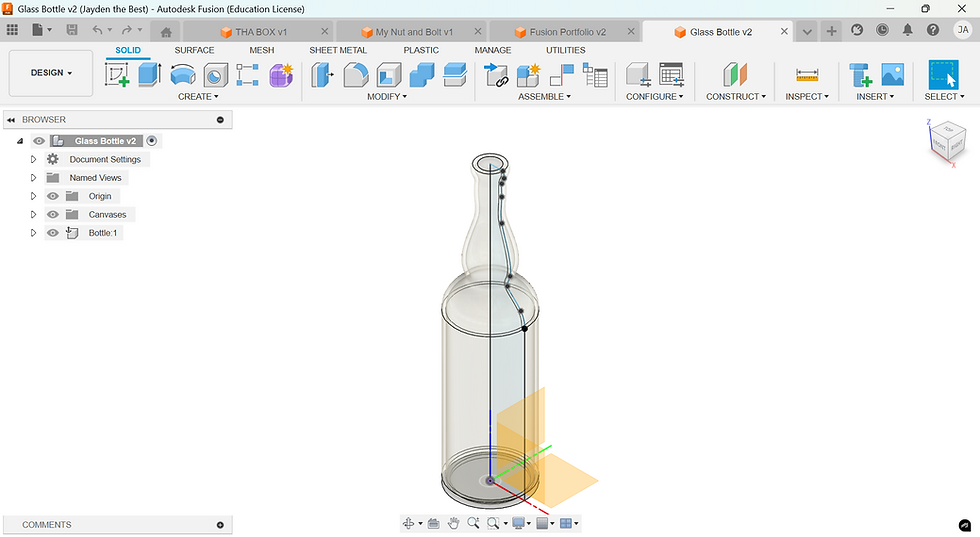
I’ve just completed my second Fusion 360 tutorial, and this time I tackled designing a sleek, modern bottle inspired by reusable water containers. The lesson began with sketching a smooth, curved profile on the front plane. Once my 2D outline was perfect, I used the Revolve tool to turn that curve into a 200 ml vessel, then added a subtle lip at the top so a cap could thread on securely. Watching my sketch blossom into a three-dimensional object again felt just as magical as the first time.
To refine the ergonomics and aesthetics, I applied a 6 mm fillet around the shoulder and a 2 mm fillet at the base, softening harsh edges and giving the bottle a comfortable feel in hand. I then used the Shell tool to hollow out the design, choosing a uniform 2 mm wall thickness that balances durability with lightweight efficiency. Throughout the process, I became more comfortable with Fusion 360’s parametric history. Meaning I can now modify the original sketch, and every downstream feature updates automatically.
When I moved into the Render workspace, I was excited by how the bottle’s material caught the light. However, I also noticed fine black lines tracing along the curvature, especially where the fillets meet the main body. They look like facet edges or surface seams bleeding through the render, breaking the illusion of a continuous, polished surface. I suspect these artifacts stem from the mesh tessellation settings or the default render engine’s handling of tight curves.
Has anyone else encountered these thin black lines in their Fusion 360 renders? What techniques helped you eliminate them for a flawless, smooth appearance? Should I increase mesh refinement settings, switch to a Class-A surface workflow, or perhaps add micro-fillets to hide the seams? I’d love to hear your tips on banishing these artifacts so my next render can truly look premium.
If you have go-to bottle-design tutorials or best practices for smoothing out renders in Fusion 360, please share them below. Your advice will help me level up my CAD skills tutorial by tutorial!
Comments